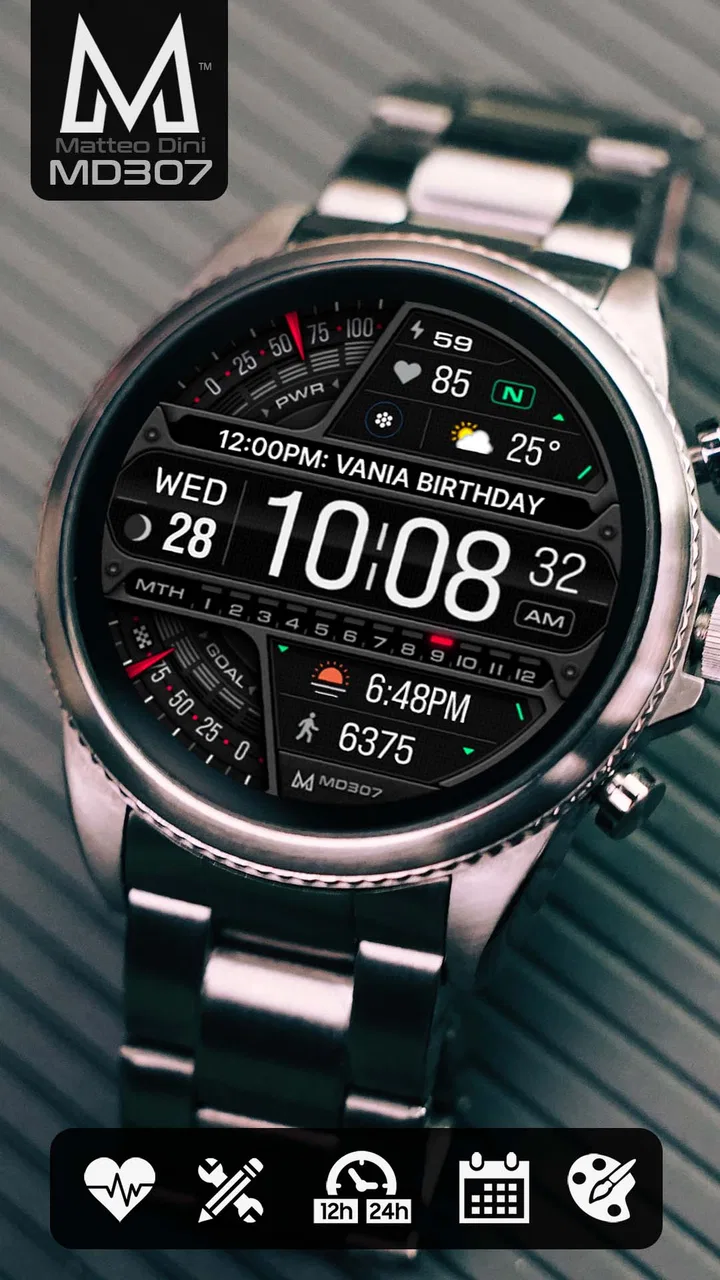
MD307 Digital watch face
- 4.4
- Rating
- 100.00K
- Installs
- $2.49
- Price
 Analysis by App-foxy
I spent time with MD307 Digital as a practical Wear OS personalization app rather than treating it as a simple decorative download. Its appeal is easy to understand: it puts a modern digital layout on your watch and lets you decide which information deserves space on the screen. That sounds straightforward, but the real question is whether its customization is useful during a normal day or merely attractive during setup.
My answer is mostly positive. This is a paid watch face from Matteo Dini MD ® Watch Faces, priced at $2.49, and it is aimed at people who want more information visible at a glance than a minimalist face usually provides. It is available for Everyone, has built a 4.4 average from around 13K ratings, and has passed 100K+ installs. Those figures suggest a well-established option, but they do not remove the need to choose carefully: a busy digital face can be excellent for one wearer and tiring for another.
How I would decide whether MD307 Digital suits you
I’d decide by tracking what I actually glance at during a typical day, rather than choosing complications because they look useful in setup. If a few recurring questions keep sending me into menus, a configurable face is worth considering; if I mostly want the time, a quieter option will probably feel better. That practical test also helps clarify where MD307 Digital earns its place in everyday use.
You May Also Like

 Blood Strike: 2.5 Anniversary
Blood Strike’s Loadouts Turn Every Drop Into a Tactical Gamble
A close look at Blood Strike’s custom loadouts: how fast access to signature weapons reshapes its battle royale rhythm, rewards preparation, and narrows the gap between fights.

 Pandora - Music & Podcasts
Pandora’s Music Is Easy to Start, but Harder to Recover
Pandora’s strength is its low-effort path from a seed to a station. Its weak spot is how much confidence it asks you to place in connection, setup, and quiet recovery.

 8 Ball Pool
8 Ball Pool Is Built on Rivalries, Rematches, and Routine
A close look at the rivalries, rematches, shared routines, and unanswered safety questions that turn a quick pool match into a persistent mobile community.

 Samsung Music
Samsung Music’s Quiet Strength Is Playing What You Already Own
Its reach comes less from spectacle than from dependable access to a personal library. That simplicity is both the app’s strongest retention engine and its ceiling.

 AccuWeather: Weather Radar
AccuWeather Review: A Quick, Clear Forecast for Everyday Decisions
For everyday plans, the best forecast is the one you can understand quickly. AccuWeather makes rain timing, radar, and local conditions easy to act on, with a few trade-offs.

 Hill Climb Racing
Why Hill Climb Racing Still Turns Crashes Into One More Run
A tiny car, a bumpy hill and one more upgrade: Hill Climb Racing keeps resurfacing because its simple chaos makes every near-miss feel personal.
More From Our News Desk



Start with the information you actually check
The first decision is not about color or style. It is about what you repeatedly look at during the day. If I only need the time and perhaps the date, a simpler watch face is easier to read and faster to understand. If I regularly check several pieces of information without opening an app, MD307 Digital becomes more interesting because its design is built around customizable complications and a broad set of data.
I would make a short list before installing it: time, date, battery status, activity information, weather, appointments, or another detail that matters to your routine. The useful test is whether each item earns its place. A complication that looks impressive but never gets checked only adds visual noise. The best result comes from treating the screen like a small dashboard rather than filling every available area.
That approach is especially helpful on a smartwatch used during commuting, errands, or exercise. I can glance down while carrying a bag or standing in a queue and see the information I chose without navigating through menus. At the same time, the face is not automatically the right choice for someone who values a very calm display. The central trade-off is information density versus instant visual simplicity.
Think about readability before appearance
A modern digital layout usually attracts attention because it feels more precise and functional than a traditional analog design. In practice, readability depends on how many complications are active, how the selected data is presented, and how comfortable you are with a screen that contains several visual zones. I found it better to begin with fewer elements, live with that arrangement, and add information only when I noticed a genuine gap.
This is one of the less obvious strengths of a configurable face: customization is not only a styling tool. It is a way to remove distractions. A deliberately restrained setup can keep the digital character while making the time easier to find. Conversely, someone who wants a watch face that is perfect immediately, with no arrangement decisions, may find the setup more involved than expected.
Consider the type of watch user you are
MD307 Digital makes the most sense for an owner who treats a Wear OS watch as a compact information panel. It can suit a workday when calendar-related information, battery awareness, and quick status checks are more useful than ornamental design. It can also work well for a person who changes layouts for different contexts, such as a dense weekday arrangement and a cleaner weekend version.
I would be more cautious if your priority is a classic watch appearance, a highly understated face, or a display that feels almost empty. The word “digital” is not just a technical description here; it points to the experience. People who enjoy seeing several data points at once will probably appreciate it more than those who regard complications as clutter.
What the price changes in the decision
At $2.49, this is a small purchase, but it is still different from choosing a free watch face. The price makes sense when you expect to keep the design installed and use its configurable areas regularly. It makes less sense if you frequently rotate watch faces and rarely spend time adjusting them.
I see the payment as buying a focused design and the ability to shape it around your habits, not as a guarantee that every possible data field will be useful to you. That distinction matters. A free alternative may be enough for someone who wants a basic digital clock, while MD307 Digital is more defensible for someone who wants a personalized information layout and expects to look at it throughout the day.
Where MD307 Digital wins in everyday use
For me, the strongest everyday case is a routine with several small check-ins—at work, while commuting, or between errands—where seeing selected details together saves repeated navigation. I’d give the most visible space to the one item I check most, then treat everything else as optional. That keeps the face useful without making every glance a scan, though some situations call for a different kind of watch face.
A glanceable dashboard for a busy routine
Imagine leaving home with your phone in a pocket, walking to a train, and checking your wrist several times before arriving. You may want the time first, but you might also care about the date, battery level, or another selected status. With a well-planned configuration, the watch face can answer those small questions without turning each glance into a separate interaction.
The important detail is that the value comes from the arrangement, not simply from having many data options. I would place the most frequently checked item where my eyes naturally land, then reserve secondary areas for information that is useful but not urgent. This reduces the habit of scanning the entire display. It is a simple workflow, but it makes a data-rich face feel much more deliberate.
Customization that serves different parts of the day
One practical use is to change the emphasis depending on the situation. During working hours, I might favor date and schedule-related information. Before a walk or other active period, I might prefer activity-oriented data. In the evening, battery awareness can become more important because a watch with little remaining charge is less useful the next morning.
This does not mean you need a radically different design every few hours. In fact, I would avoid constant changes because they create their own friction. The better strategy is to find one dependable arrangement first, then make a second version only if your routine genuinely changes. The face is most useful when it supports habits rather than becoming another thing to manage.
Why the digital format can be more practical
For quick time checks, digital numerals are direct. There is no need to interpret hand positions, and the surrounding fields can reinforce the same glance with supporting information. That makes the face particularly comfortable for people who prefer exact visual information over the softer, more decorative feel of an analog layout.
I also like the way a digital face can make the watch feel more like a tool. That is not universally better. A traditional face may blend more naturally with formal clothing, and a minimal design can look more elegant in situations where a dashboard-like screen feels too technical. MD307 Digital wins when usefulness is part of the aesthetic rather than something hidden behind it.
Useful customization is better than maximum customization
A common mistake with configurable watch faces is assuming that more choices automatically produce a better result. My experience suggests the opposite. The strongest setup is usually the one that answers a small group of recurring questions: What time is it? What day is it? How much charge remains? Is there one piece of status information I need right now?
That is also where the app can reward patience. Instead of judging the default arrangement immediately, I would spend a few minutes identifying which areas are genuinely valuable and which ones compete for attention. This is a concrete advantage over a fixed face, because the layout can be adapted to personal priorities rather than accepted as-is.
The developer and the product’s maturity
Matteo Dini MD ® Watch Faces is the developer behind this app, and the product’s presence in the store gives it a level of familiarity that a newly discovered face may not have. It was released on Nov 3, 2022, and the combination of its rating history and install base makes it feel like an established purchase rather than an experimental one.
I would still separate that reassurance from the actual fit on your wrist. A popular watch face can remain wrong for someone who dislikes dense displays or wants a free option. The useful takeaway is simply that MD307 Digital has enough visibility for a buyer to consider it seriously, while the final decision should come from the way you use your watch.
Where another type of watch face may fit better
I’d look beyond this style if I wanted the watch to feel more like jewelry, preferred an uncluttered clock, or relied on one specialized activity above all else. Those are not shortcomings so much as different priorities: atmosphere, simplicity, or a focused task can matter more than a flexible digital dashboard. The remaining question is how much effort the switch itself asks of me.
Choose a minimalist face when recognition matters most
If you want to glance at your wrist and identify the time instantly with almost no visual competition, a minimalist alternative may be better. Such a face can feel calmer during meetings, while reading, or whenever the watch is mainly a clock. It may also require less setup because there are fewer decisions about what belongs on the screen.
That does not make MD307 Digital poorly designed. It simply reflects a different priority. This app is for someone who sees value in configurable information. A minimal face is for someone who wants the watch to disappear until the exact time is needed. I would not choose a data-focused layout for a user who already knows that extra fields make them ignore the display.
Choose an analog style when appearance leads the decision
Some Wear OS owners buy a watch face to complement clothing, a watch case, or a particular social setting. An analog alternative can provide a more familiar, jewelry-like impression, especially when the main goal is visual character. MD307 Digital has a more functional personality, so it may feel out of place if you are looking for something that imitates a traditional wristwatch.
The comparison is not about which format is objectively superior. It is about whether you want the screen to communicate data or atmosphere. I would pick this app for errands, work, and daily monitoring; I would look elsewhere if the face needs to act primarily as an accessory.
Choose a free option when experimentation is your priority
A free face is the safer route for someone who changes designs often or is still discovering what works on a Wear OS watch. You can experiment without a purchase and may find that a basic layout covers everything you need. The downside is that free alternatives may not provide the same focused combination of modern digital styling and configurable data areas, depending on what you compare.
For me, the $2.49 price is reasonable when the face becomes part of a daily routine. It is harder to justify for casual browsing. Before buying, I would ask whether I am looking for a long-term default or simply another design to try for a day.
Choose a specialized activity face when one use dominates
If your watch is used almost entirely for one particular activity, a specialized alternative may be more efficient. A face designed around that single purpose can put the relevant information first and reduce everything else. MD307 Digital is more flexible as a general-purpose dashboard, but general flexibility is not always the same as specialization.
This is an important exception. Someone who wants one very specific screen during every workout may prefer an option built around that activity. Someone who moves between work, travel, daily errands, and occasional exercise may benefit more from a face that lets them select different kinds of data.
What switching to it is really like
Switching is less about learning a complicated system and more about making a few deliberate choices, then checking them against real habits. I’d begin with only the details I know I use, wear that arrangement through an ordinary day, and remove anything I keep ignoring. That small trial makes it easier to tell whether the face has lasting value or was mainly appealing as a fresh design.
The initial setup is part of the purchase
The main cost of switching is not the money; it is attention. A configurable face asks you to make choices. You need to decide which complications belong in which places, then judge whether the result remains readable in ordinary use. I consider that worthwhile, but only if you enjoy tuning your watch rather than expecting a finished design that never needs adjustment.
My recommended workflow is simple. Start with the time, date, and one or two items you check often. Wear that arrangement through a normal day. Only after noticing a real need should you add another field. This prevents the common problem of building a crowded screen during setup and then abandoning it because the display feels harder to read.
Plan around battery awareness
A watch face that exposes battery information can be useful because it turns charging into a visible part of the routine. I would use that information to decide when the watch needs attention rather than waiting until the device becomes inconvenient. This is especially practical for people who rely on the watch for notifications or daily tracking.
At the same time, no layout can make a battery last longer simply by displaying its status. The benefit is planning, not improved endurance. If battery life is your primary concern, a simpler face may still be preferable because fewer visual elements can feel less demanding, though I would not treat the face alone as a solution to power management.
Expect to refine rather than constantly rebuild
One of the best ways to use MD307 Digital is to treat customization as a one-time design exercise followed by occasional refinement. After a few days, you will know which fields you actually read and which ones you skip. Removing unused information can make the remaining details feel more prominent without changing the overall identity of the face.
This is also a useful way to compare it with fixed alternatives. A fixed face may be faster to install, but if its layout does not match your habits, you must tolerate that mismatch or replace it. Here, the switching cost is paid at the beginning, while the potential benefit is a closer fit over time.
Who should skip it
I would skip this app if I want a completely free experience, strongly prefer analog styling, or know that I never use complications. I would also hesitate if I dislike making layout decisions. Paying for customization that I will not use would be wasteful, even at a modest price.
I would also look elsewhere if my watch use is centered on one specialized activity and I want that activity to dominate every part of the screen. A focused alternative may be clearer in that narrow situation. MD307 Digital is at its best when the watch has several jobs and I want one face to bring those jobs together.
My recommendation after using it
I recommend MD307 Digital to Wear OS owners who want a modern digital appearance with room for meaningful, glanceable information. Its strongest quality is not merely that it offers customization; it is that the customization can turn the watch face into a personal dashboard for workdays, travel, errands, and changing routines. The result depends on choosing carefully, but that is also where the app earns its place.
I would buy it when I had already identified several pieces of information I wanted available without opening separate watch screens. The $2.49 cost feels fair for that use, particularly if the face becomes a long-term default rather than a temporary experiment. The Everyone rating also makes it broadly approachable, while the established 4.4 average and 100K+ installs provide useful reassurance that it is not an obscure choice.
My advice is to resist filling every slot on the first attempt. Build a clean arrangement, wear it through a normal day, and add only what repeatedly proves useful. That small discipline is the difference between a readable information tool and a cluttered display. It is also the most important practical tip I can offer someone deciding between this app and a simpler alternative.
In the end, I see MD307 Digital as a strong middle ground: more informative than a basic clock, less narrowly focused than a specialized activity face, and more functional than an analog design chosen mainly for appearance. It is not the universal best choice, and it should not be purchased by someone who wants visual silence. For the right wearer, though, its real value is the ability to make a single digital watch face match the way the day is actually lived.
FAQs for MD307 Digital watch face
01What is MD307 Digital watch face?
MD307 Digital watch face is a customizable digital watch face designed for compatible Wear OS smartwatches. It focuses on clear, easy-to-read information, typically including the time, date, battery status, and other glanceable details. The exact layout, colors, complications, and available options may depend on the version installed and the capabilities of your particular smartwatch.
02Which smartwatches are compatible with MD307 Digital watch face?
Compatibility depends mainly on whether your device runs a supported version of Wear OS and whether the watch face is distributed through the appropriate Google Play listing. Before downloading, check the store page for the developer’s current compatibility information. Some older watches, non-Wear OS devices, or watches using proprietary operating systems may not support installation or all available features.
03How do I install and apply MD307 Digital watch face?
After downloading MD307 Digital watch face from the official store, it can usually be installed from the phone’s companion app or directly through Google Play on the smartwatch. Once installation is complete, open the watch-face selector on your watch, find MD307 Digital, and choose it. If it does not appear immediately, synchronizing the watch or restarting both devices may help.
04Can MD307 Digital watch face be customized?
MD307 Digital watch face is intended to provide personalization, although the available controls can vary by edition and watch model. Users may be able to change colors, display styles, complications, or other visual elements through the watch-face customization menu. Some options may only be available on supported devices, so review the store description and preview images before downloading if a specific layout is important to you.
05Does MD307 Digital watch face affect battery life or require special permissions?
Like any active watch face, MD307 Digital uses some smartwatch battery because the display must refresh and may access information such as battery level, date, or complications. Its impact is generally influenced by screen technology, brightness, always-on display settings, and update frequency. Permissions can vary, so check the installation prompts carefully and grant only those needed for the features you plan to use.
Pros
- Clean digital layout makes the time easy to read at a glance.
- Useful complications let you display key information on the watch face.
- Customizable color options help match different watch bands and styles.
- Designed to use limited screen space efficiently on compatible devices.
- Minimalist appearance works well for everyday wear and casual outfits.
Cons
- Compatibility may vary depending on your Wear OS watch model.
- Some customization options may require exploring the watch-face editor.
- Small complications can be difficult to read on watches with smaller displays.
- The digital design may feel too plain for users who prefer analog watch faces.
- Battery impact can vary when using animated or frequently updated complications.

MD307 Digital watch face
Gallery